Local Ranking Grids

Local Ranking Grids API

Beta — The Local Ranking Grids API is currently in beta. Endpoints and response formats may change as we iterate.

Overview

The API provides access to your list of grids and summary metrics, making it straightforward to integrate with third-party reporting tools.

What's available

What's not available yet

Endpoints

Endpoint Returns
GET /grids Your grids, paginated.
GET /grids/{grid} A single grid.
GET /grids/{grid}/runs The grid's scan history, most recent first, paginated.
GET /grids/{grid}/runs/{run} One scan in full.
GET /grids/{grid}/runs/{run}/points Every scanned grid point with your rank at each.
GET /grids/{grid}/runs/{run}/points/{point}/ranks Every business that ranked at one point.
GET /grids/{grid}/runs/{run}/competitors Every business the scan saw, strongest first.
GET /grids/{grid}/runs/{run}/competitors/{cid} One business, plus its rank at every point.

{grid} is the grid's UUID, {run} a run id from the runs endpoint, {point} a point id from the points endpoint, and {cid} a business's Google CID.

Every run a grid has ever produced is reachable through /runs, so you can walk a grid's history backwards in time a page at a time.

Reading a rank

A point's rank is null when the business did not appear in that point's results at all. Read it alongside results_count, which is how many businesses the scan returned there: a count below 100 means the list was not truncated, so a null rank is a genuine absence rather than a placement somewhere out of reach. A rank of 100 is a real hundredth-place finish and never stands in for "absent".

Only scanned points are returned. If you have masked points out of your grid, they are left out of these responses entirely — the same way they are left out of the CSV export — and their ids are not addressable, so asking for one returns a 404.

Reading opening hours

A competitor's business_hours is the business's week, Monday first, with all seven days always present so there are no gaps to handle:

[
    { "day": "monday", "status": "open", "periods": [{ "open": "07:00", "close": "17:30" }] },
    { "day": "saturday", "status": "open", "periods": [{ "open": "08:00", "close": "12:00" }, { "open": "13:00", "close": "16:00" }] },
    { "day": "sunday", "status": "closed", "periods": [] }
]

status is open, closed, or open_24_hours. Only open carries periods — the other two say all there is to say. More than one period means split hours, such as closing over lunch, and a period whose close is at or before its open runs past midnight into the next day, so 18:00–03:00 is a nine-hour evening rather than a negative one.

Times are local to the business. business_hours is null when we hold no hours for a business at all, which is a different statement from a business that is shut every day — that one comes back as seven days of closed.

Two ways through a scan's ranks

Both of these read the same data from opposite directions, so pick whichever matches the shape of what you are building:

Authentication

All API requests require a Bearer token in the Authorization header:

Authorization: Bearer YOUR_API_TOKEN

Generating an API key

You can generate an API token directly in the app. Click your profile dropdown in the top right and select API Access.
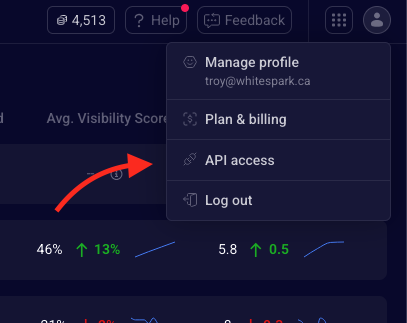
API Access screenshot

MCP server (AI agents)

Everything above is also reachable over MCP, so an AI assistant can read your grids directly rather than being handed exports of them. It is the same read-only data, scoped the same way, behind the same token — there is nothing an agent can reach over MCP that it could not reach over the REST API, and nothing it can change.

Setting it up

The quickest route is to let the agent configure itself: paste this into Claude Code, Claude Desktop, Cursor, or any other MCP-capable assistant.

Read /api-docs/mcp-install.md and follow it to connect me to the Local Ranking Grids MCP server.

To configure a client by hand instead, point it at /mcp as a streamable-HTTP MCP server sending the Authorization header on every request.

Tools

Tool Returns
list_grids Your grids, newest first. Start here — every other tool needs a grid_id.
get_grid One grid in full, metrics and trends included.
list_runs A grid's scan history, most recent first.
get_run One scan, optionally with every point's rank inline.
get_run_points Every scanned point with your rank there.
get_point_ranks Every business that ranked at one point.
list_competitors Every business a scan saw, strongest first.
get_competitor One business, plus its rank at every point.

Lists page at up to 50 rows rather than the REST API's 100, and a list row carries a summary where the REST API returns the full record — a grid's trend series and a competitor's opening hours come from get_grid and get_competitor. The rate limit is 60 requests per minute.

Interactive API Reference

Explore the full API schema and try requests interactively in the API Reference.

Errors

A resource you cannot read — one that does not exist, or that belongs to someone else — returns a 404 with an empty body. The two cases are deliberately indistinguishable, so the API never confirms that an id exists to somebody who has no access to it. Check the status code; there is nothing in the body to parse.

A request without a valid token returns 401 with {"message": "Unauthenticated."}.

Pagination

Most collections are returned in pages. Control pagination with query parameters:

Parameter Description
page The page number to retrieve. Defaults to 1.
per_page Number of records to return per page. Defaults to 50, maximum 100. Values above the maximum are clamped to it.

The per-point endpoints are the exception: a grid is at most 13×13, so /runs/{run}/points and /points/{point}/ranks return their full set in one response rather than making you page a bounded list. Their meta describes the collection instead of carrying page numbers.

Each response includes a meta object alongside data:

{
    "data": [ /* ... */ ],
    "meta": {
        "current_page": 1,
        "last_page": 3,
        "per_page": 50,
        "total": 132
    }
}

Latest Screenshot URL

You can embed the latest screenshot for any grid using the following URL pattern:

GET /grid/{grid_id}/download-screenshot/{mode}
Parameter Description
grid_id The UUID of the grid. Find this in the URL when viewing your grid.
mode Should the screenshot include metrics in the image. Options: with-metrics, without-metrics

This URL returns the most recent available screenshot for the grid, so you can use it as a static link in your reporting tools or embed it with an <img> tag. If no screenshot exists for the grid yet, it returns a 404.

Screenshots are generated when you request one from the grid page. To keep this URL up to date automatically, enable Automatic screenshots on the API access page — every completed scan will then generate a screenshot without any manual action.